

You are moving from customer support into product work. The posting asks for customer research, analytics and enterprise onboarding. You have relevant experience, but you do not want an AI draft to turn it into a job you never held.
Fit helps you separate what your evidence supports from what you still need to explain or ask.
Run a fit check#
- Save the posting in Applications.
- Add relevant experience in Career → Knowledge, and keep the facts you want used switched on.
- Open the application’s details, select Open workspace, then Fit.
- Read the line explaining what will be sent to your AI connection, then choose Check fit.
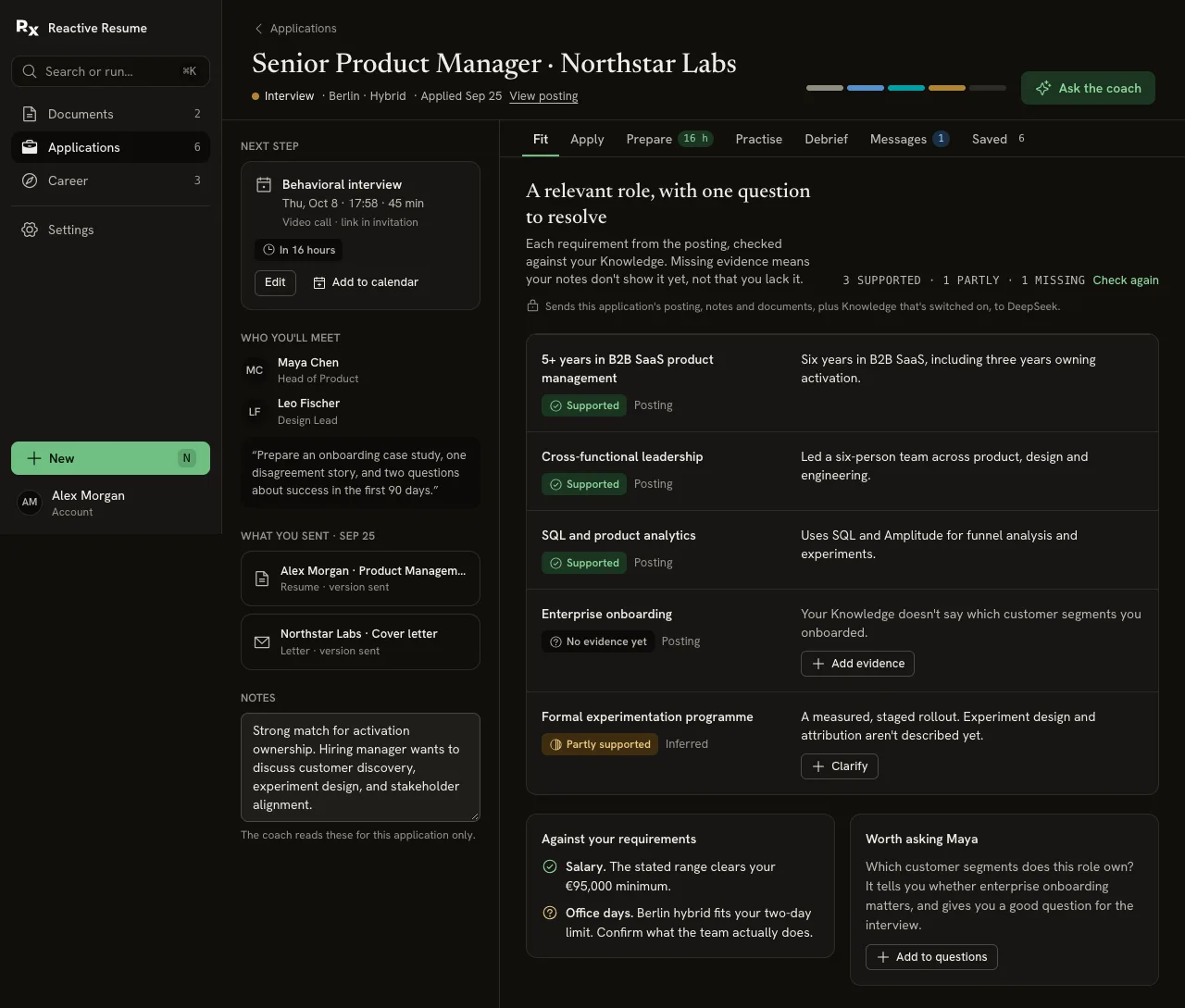
The result checks requirements from the posting against your facts. It also compares available job details with preferences such as minimum salary, location and office days.
Read the evidence, not a score#
| Label | How to use it |
|---|---|
| Supported | Your recorded facts directly support the requirement. Check that the description is accurate. |
| Partly supported | Related experience exists, but something is not explained yet. Describe the overlap and its limits. |
| No evidence yet | Knowledge does not show this experience. Add a real example if you have one, or leave it as a question. |
| Posting | The requirement was stated in the saved posting. |
| Inferred | The check read it between the lines. Confirm whether the employer actually expects it. |
There is no fit percentage. Missing evidence is not missing ability, and a supported row is not a promise that you will get an interview.
Add genuine overlap#
For the career-switch example, “I interviewed customers about repeated setup problems” might support customer research. It does not establish that you owned a formal research program or worked with enterprise customers.
Choose Add evidence or Clarify on a gap. Write the experience you can support and save it. This adds a shared fact to Knowledge, so it can help in other applications too. Use the offered Undo if you added it by mistake.
When the underlying context changes, a fresh check may be needed. Choose Check again when offered. Review the new assessment rather than assuming every gap has disappeared.
Turn unknowns into questions#
Use the suggested question under Worth asking…. Add to questions puts it with the questions for this application in Prepare.
Useful questions include:
- “Which customer segments would I work with?”
- “Is formal experiment design expected from day one?”
- “How many office days does this team actually work?”
An unstated salary or office policy stays unknown. Ask the employer rather than treating a missing detail as a match.
Decide what to say#
Write an honest bridge between your experience and the role: “I have done customer interviews and worked with product teams on setup improvements. I have not yet owned enterprise onboarding.”
You can now draft the application answer or ask the workspace coach how to explain that overlap. You decide whether the role is worth applying for.